
Zewify All products

A menu bar app for Mac

Your Claude usage limits, always in view.

Gondar keeps the current session’s usage in your menu bar. Click it for every limit: the session, the weekly limits and any per-model ones, each with how much is used and when it resets.

curl -fsSL https://zewify.com/gondar/install.sh | sh
Paste it into Terminal. Run it again to update. Needs macOS 14 or later.

Free, with its source on GitHub. Needs Claude Code, signed in with a Claude subscription.

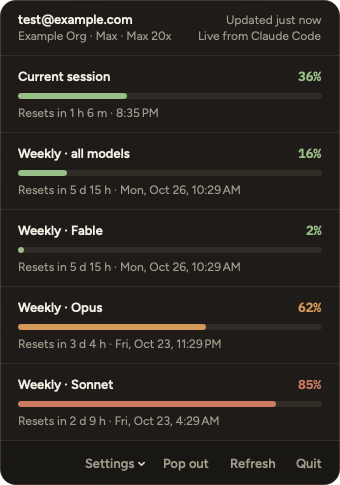
Gondar’s panel for a made-up account, test@example.com at Example Org on Max 20x, updated just now, live from Claude Code. Current session 36% used, resets in 1 h 6 m. Weekly, all models 16%. Weekly, Fable 2%. Weekly, Opus 62%, in amber. Weekly, Sonnet 85%, in red. Each shows when it resets. Settings, Pop out, Refresh and Quit along the bottom.

The panel

Every limit, a click away

Click the percentage in the menu bar and Gondar lists every limit on your plan, in the order Anthropic gives them. A limit Anthropic adds later shows up on its own, without an update.

  • Each limit has a bar, the percentage used, and when it resets, as a countdown and a clock time
  • Colour shows the level: green under 50%, amber from 50%, red from 80%
  • The header names the account, its organisation and plan, and how old the numbers are
  • When you have paid extra usage turned on, a last row shows what you have spent

Pop-out window

A window that stays on top

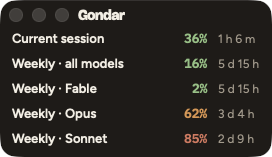
Pop out in the panel opens the same limits in a small window of their own, one line each, above your other windows on every desktop and over full-screen apps.

  • Each line is the limit’s name, the percentage used and the time left until it resets
  • Drag it and resize it; it opens where you left it, even after a restart
  • Closing it leaves Gondar running in the menu bar
Gondar’s pop-out window: the window buttons and the name Gondar, then one line per limit. Current session 36%, 1 h 6 m left. Weekly, all models 16%, 5 d 15 h. Weekly, Fable 2%. Weekly, Opus 62%, in amber, 3 d 4 h. Weekly, Sonnet 85%, in red, 2 d 9 h.

Where the numbers come from

From the account Claude Code is signed in to

Gondar reads Claude Code’s login from your Keychain, using macOS’s own security tool, and uses it only to ask Anthropic (api.anthropic.com) for the account’s usage and profile, every 5 minutes. Sign in to another account in Claude Code and Gondar switches to it.

It never sends a prompt, never refreshes or changes the login, and never writes to the Keychain or to Claude Code’s files. When it cannot get new numbers, it keeps the last ones and says how old they are and why, so old numbers never look current.

Optional

Live numbers from Claude Code’s status line

Claude Code reports the same limits to its status line after each reply. Route your status line through gondar-feed, a small tool that comes inside Gondar, and the numbers update while you work; Gondar then asks Anthropic only every 15 minutes, to check the account and for the limits the status line does not carry.

It is one change to statusLine.command in ~/.claude/settings.json, which you make yourself: Gondar only reads that file. Settings → Connect Claude Code’s status line… in the panel works out the exact command for your settings, and the README on GitHub shows it step by step. Your status line looks the same as before.

Resource use

Light on your Mac

Gondar sits in the menu bar and asks Anthropic only every 5 minutes. With the panel and pop-out closed it used about 0.07% of one core, took no GPU time, and its energy impact read 0.0 in every state.

Measured on an Apple M4 Mac with 10 cores, with the 0.1.0 release build
StateCPUMemory
Menu bar only0.07%26 MB
Pop-out open0.08%up to 36 MB resident
Panel open0.06%up to 48 MB resident

CPU is the share of one core. Memory is the footprint when idle (resident 36 to 43 MB) with 6 threads. If you connect Claude Code’s status line, each refresh of gondar-feed takes about 10 ms and 2 MB, then it exits. Measured on an Apple M4 Mac with 10 cores, with the 0.1.0 release build; the method is in the README on GitHub.

Install

Install, update, uninstall

Gondar installs with one command in Terminal, and never asks for your password. It needs macOS 14 or later, and Claude Code signed in on this Mac with a Claude subscription.

curl -fsSL https://zewify.com/gondar/install.sh | sh
Paste it into Terminal. Run it again to update. Needs macOS 14 or later.

Where it goes

Into your Applications folder, or into the Applications folder in your home folder when your account cannot write to the main one. It opens in the menu bar straight away, and starts again when you log in unless you turn that off in Settings.

Gondar is installed with this command rather than a download link. Its source is published on GitHub, so you can read exactly what it does.

Updating and uninstalling

Run the same command again to update. Gondar checks for a new release once a day and says so in its panel.

To uninstall, turn off Settings → Launch at login and quit Gondar. If you connected Claude Code’s status line, put statusLine.command back as it was. Then delete the app, the folder ~/Library/Application Support/Gondar/ and the file ~/Library/Preferences/com.zewify.gondar.plist.

Privacy

Your login stays yours

  • Used only to read your usageThe login goes only to api.anthropic.com, and is never logged or written to disk.
  • Two small files on your MacThe last numbers shown, and the limits Claude Code’s status line reports. Never a token or an email address.
  • No account, no trackingNo sign-in of its own, no analytics and no advertising of any kind.

Know where your limits stand

Gondar is free, with its source on GitHub, for macOS 14 or later.

curl -fsSL https://zewify.com/gondar/install.sh | sh
Paste it into Terminal. Run it again to update. Needs macOS 14 or later.

Gondar is made by Zewify and is not affiliated with Anthropic. Claude and Claude Code are trademarks of Anthropic.